Seneca Careers · for employers
Moneyball for Hiring.
Seneca Careers shows you how a candidate actually works: the questions they asked, the drafts they revised and the fixes they made, shared by the candidate for your role.
Pedigree is easy to read, so it gets overpriced. These records let you see the work itself, with the AI's replies next to their words shown and labelled as the AI's.
- Live alpha
- Pilot: employers reviewed
- Free for candidates
AI assistant, just before her message
The arithmetic is right for the costs you listed, but the unit cost looks incomplete. Your cost table has cups, lids and sleeves on a separate line, and they are not in the $0.78. […] It is worth recomputing with every per-cup cost included.
Candidate
Right, the cups and lids were on the supplies tab. I recomputed the unit cost: 0.78 + 0.19 = 0.97. The margin is 2.25 - 0.97 = 1.28 now and 2.50 - 0.97 = 1.53 at the new price, so the price rise breaks even unless weekday volume drops more than 16%, not the 15% I had.
One record shows one moment. It does not establish a skill, a habit or a trait.
The hiring problem
Hiring pays a premium for pedigree because it is easy to read.
A school name, a former employer and a polished résumé are quick to compare. They say little about how someone handles a number that doesn't add up, or what they do with a reviewer's comment. That is the part of a candidate the market prices worst, and often the part you most want to see.
Seneca Careers adds that view to the review you already run, from the candidate's own learning record, when they choose to share it. It sits beside the application. It makes no decision for you.
How a record reaches you.
Five steps. The candidate controls the first three. After that the shared work opens with the application: there is nothing to fill in first.
The candidate
Previews their records
They see each record exactly as you would, and can add context in their own words.
Picks what to share
Record by record, for this application, with any passage redacted.
Shares for one role
With you only, for the role they applied to, until an end date they set.
You
Open the shared work
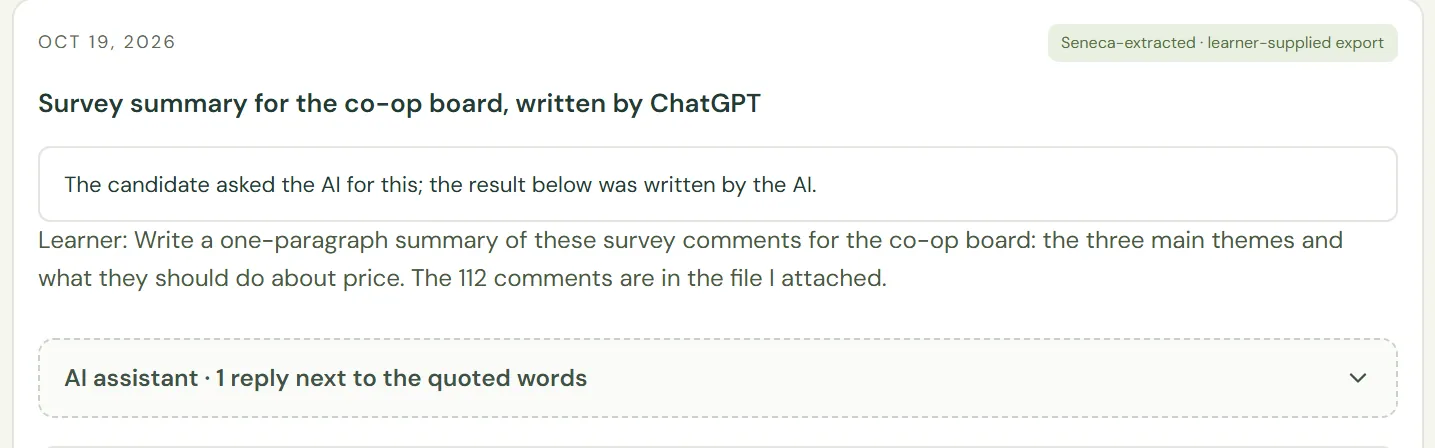
Their words, the AI's replies next to them labelled as the AI's, where each record came from and what it cannot show. No score is produced.
Ask about it
"Ask about this" starts a message to the candidate about that record, so the next step is a conversation.
The candidate can withdraw at any time. The records leave your view and a plain notice tells you so. What you already read can't be recalled, and the candidate is told that before sharing.
See each step in the walkthroughA fictional example
Three weeks of Maya's work, in her records.
FictionalMaya Chen is a made-up business student applying for a made-up analyst internship at Northgate Analytics, also made up. Her records come from the product's demo.
What "longitudinal" means here: records from different weeks, so you see how someone's work changed over time instead of judging one polished snapshot.
Shared with Northgate for this roleKept private
-
The co-op's finance lead told her to lead with the answer.
Written by MayaKept private
-
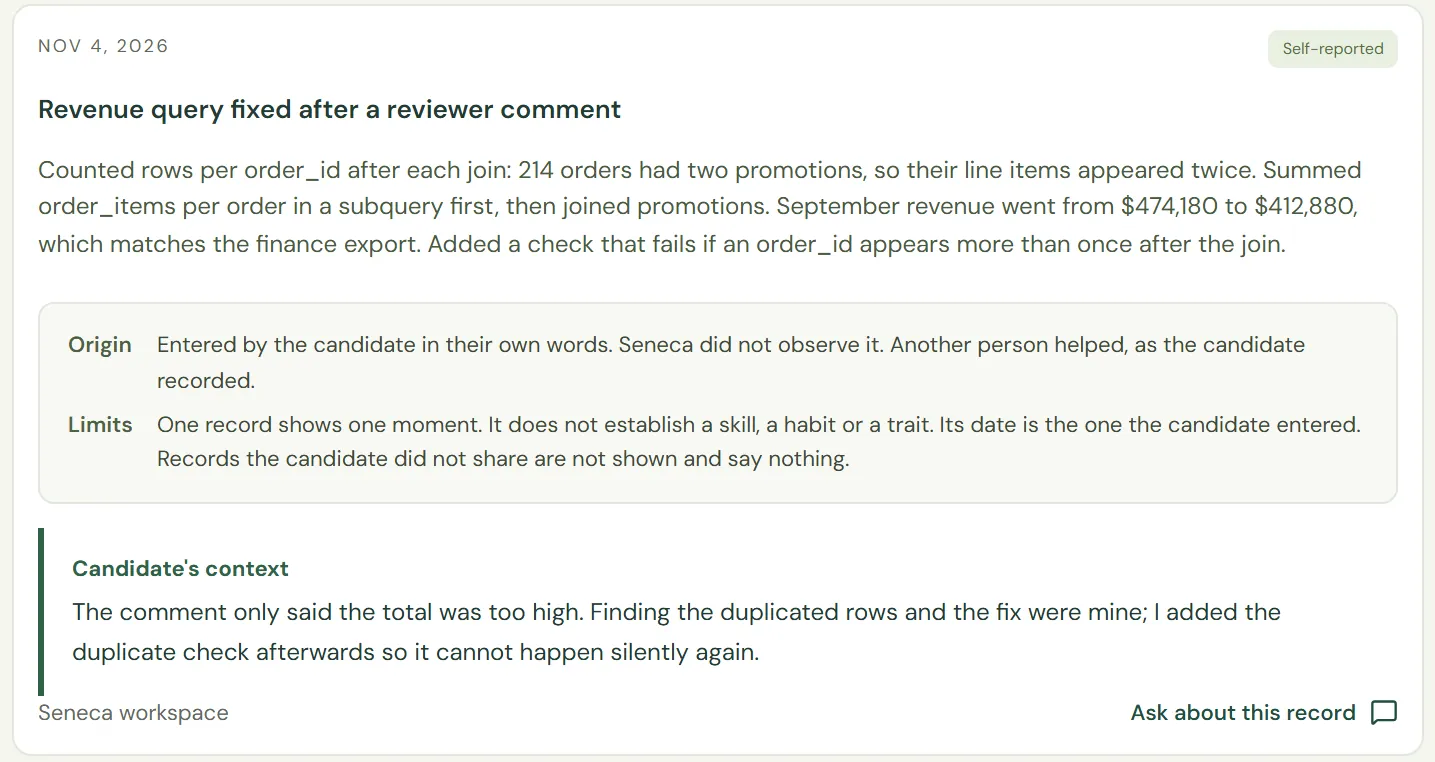
A teaching assistant said her September revenue total was higher than the finance export.
Written by MayaKept private
The candidate decides. The AI's part stays visible.
Candidates learn with AI, and the records show where it helped. Here is what that means for what you receive and how to read it.
What the candidate controls
Nothing about their learning reaches you unless they send it, for your role.
- Each record, chosen one by one for this application. Applying shares nothing; sharing is a separate step.
- One employer, one role. Only the account responsible for the application can open it.
- An end date they set, up to 90 days.
- Redaction. A hidden passage reads [redacted] where it was; the rest of the record stays as approved.
- Withdrawal at any time, which removes the records from your view.
How to read AI-assisted records
Read them for how someone asks, checks and corrects, then ask about them.
- The AI's replies stay in the record, labelled "AI assistant". A candidate can redact a name in them but cannot remove them.
- A request the AI fulfilled is labelled as the AI's work. If the candidate only asked and the AI wrote the result, the record says so plainly.
- AI-assisted work never proves independent ability. Every record also states that one moment does not establish a skill, a habit or a trait.
What you never get
- Records the candidate didn't share
- A search or filter over anyone's records
- A score, rank or prediction from Seneca
- A total or an average of anyone's reviews
- A certificate of skill
- A decision made for you
What a candidate leaves out says nothing about them, and the employer view says so wherever records appear.
Who else saw the work
Confirmed by the people who were there.
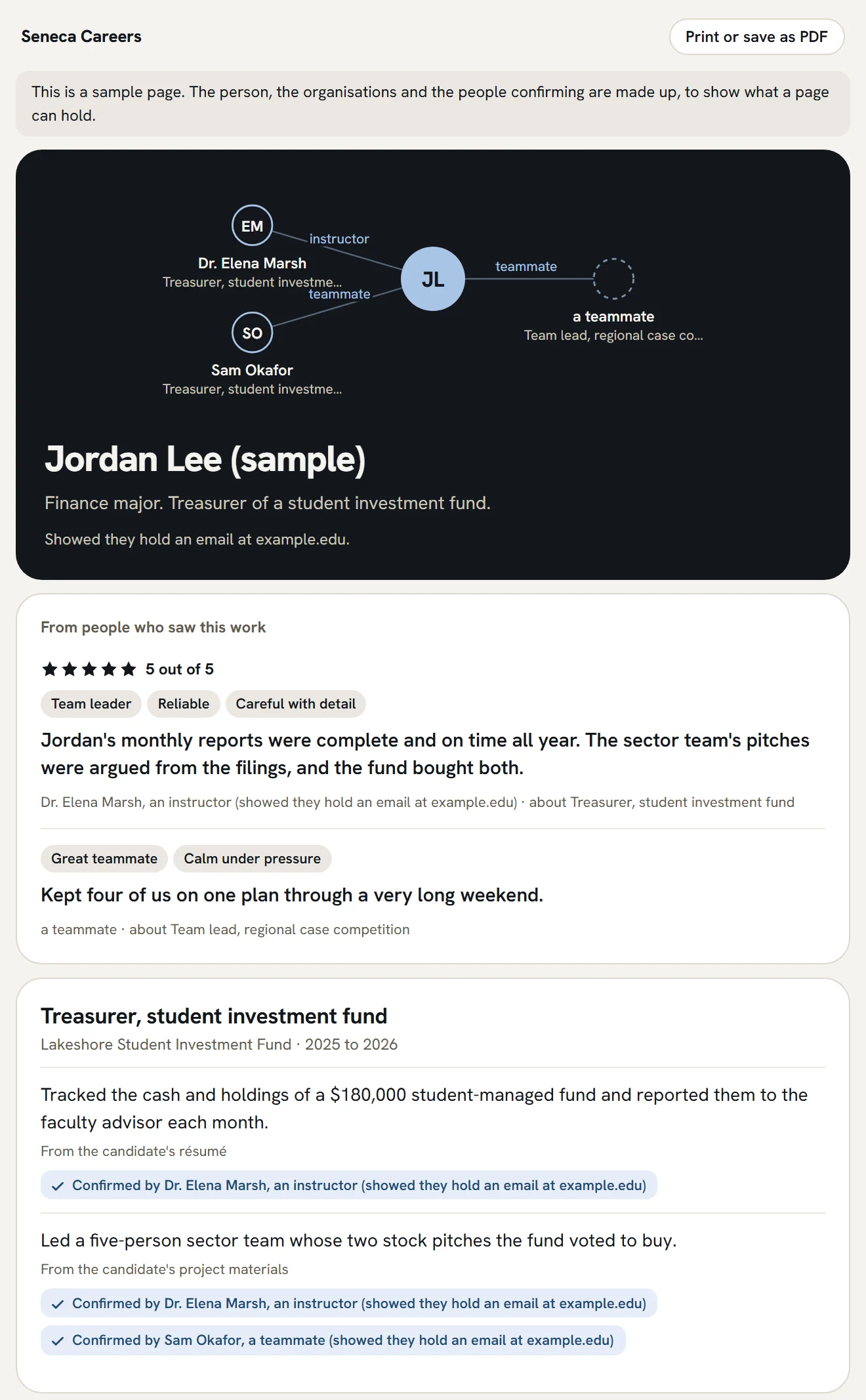
A candidate can also send you a page of their own: each piece of work written up in a few lines, with a teammate, a supervisor or an instructor confirming the lines they saw and leaving a review. You read a claim and, beside it, who else says it happened. It comes as a link from the candidate: one page for all their work, or one made for your role.
What the page tells you
- Who confirmed each line. "Confirmed by a supervisor", "a teammate" or "an instructor", so you know how that person knows the work.
- The email behind it. If that person holds a school or work email, the page shows where it is (the part after the @), and their name if they agreed to be named. When that address has the same name as the organisation on the work, the page says so.
- What they thought of the work. A review is a rating out of five, a few words from a fixed list such as "Reliable" or "Team leader", and a short comment, shown with who gave it.
How to use it
- Ask about the confirmed lines. Each one says who confirmed it, so your interview can start with work someone else saw.
- Each review is one person's. It is shown whole, with who gave it and which piece of work it is about.
- How many reviews you see depends on the candidate's plan. A page shows up to 3 of the reviews they chose on the free plan, up to 10 on Premium and all of them on Pro. Read the ones that are there; a short list says nothing about the candidate.
- A star by the name is a membership. It marks a Seneca Careers Premium or Pro member. It is not a rating of the candidate or the work, and nobody who saw the work gave it.
- The words are the ones they saw. A confirmation is for the exact words that person ticked. If the candidate edits a line, its confirmation comes off.
Built on Seneca AI
Where the records come from.
Careers runs on Seneca, the learner-controlled learning record Vindica builds. Four parts do the work.
- 01
Import
The candidate exports their chat history from ChatGPT, Claude or Gemini. The file is read in their own browser, and they pick which conversations to upload. Or they write a moment down themselves, and it is labelled self-reported.
- 02
Extract
A model finds moments where they worked something out. Each quote is the candidate's own words, copied exactly from the file; a quote that can't be found in their messages is dropped.
- 03
Keep
Each moment is saved with its date, its source and who took part, in a standard format other learning tools can read (xAPI).
- 04
Share
Sharing is a permission the candidate grants per role. You read a frozen copy of exactly what they approved; a later edit reaches you only if they share again.
Building a learning tool that could send records? Read the Careers integration guide.
Where it stands.
No hiring outcomes have been recorded yet, so we make no claim that a record predicts performance. During the pilot we follow up with each employer ourselves to learn whether the shared work was useful.
- Live alpha
- Running on vindicaseneca.com today, and still changing.
- Reviewed employers
- A Seneca operator reviews each employer before its roles are visible.
- Free for candidates
- Keeping and sharing a record costs a candidate nothing.
- Employer plans
- Free for employers during the pilot. Subscriptions are planned for later.
See it before you talk to us.
The walkthrough shows each screen an employer sees, with fictional people. When you want to try it on a real role, set up your employer workspace, or email Kevin.